Paper trading: practice a cash-account workflow
Enable Paper mode, understand its fill model, place and cancel a practice order, and reset the session.
Paper mode simulates trading against the selected provider’s market data. The current account is cash-funded and long-only, supporting active spot and stock listings. It does not support derivatives, short selling or margin. A supported listing also needs authoritative contract, lot and price-step metadata; the existence of a chart alone does not establish paper-trading support.
Open the Paper controls
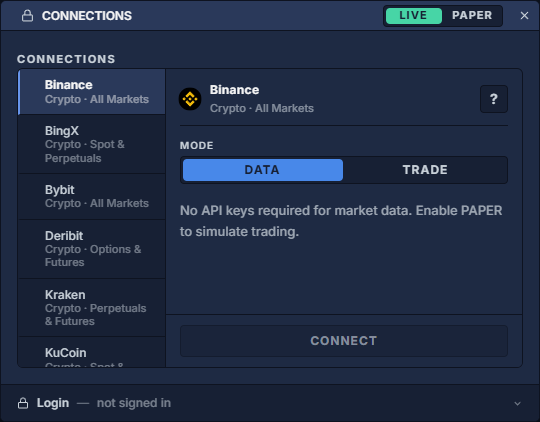
- Sign into the terminal, then open the account menu → Connections. A provider connection indicator can also open that provider’s connection settings. Connect a provider shows the dialog.
- Disconnect the current provider sessions before changing Live/Paper mode. Disconnecting a real connection does not cancel its exchange orders.
- In the Connections dialog header, click PAPER. This opens Paper Trading Settings; it does not by itself create a connected practice account.
- Review Starting Balance and Slippage, switch Enable Paper Trading to ON, close the settings and select the intended market-data provider.
- Use Apply / Connect as shown in Connections. Recheck that Paper is active before opening a trading panel and selecting a supported cash instrument.
Starting balance, slippage and fills
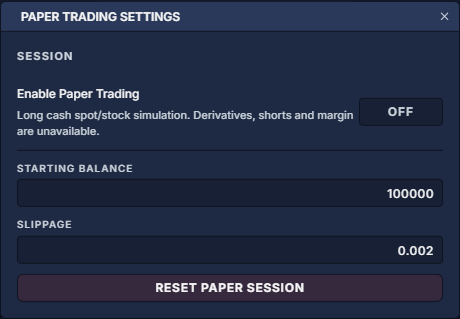
Starting Balance is the initial simulated cash amount; the dialog allows 1,000 to 1,000,000,000. An existing account is not replenished merely by changing this field: use the explicit reset workflow when you intend to restart. The first accepted order establishes the account’s quote currency, and subsequent instruments must use the same cash currency. There is no implicit currency conversion.
Slippage is a decimal fraction: 0.002 = 0.2%. The simulator applies adverse price adjustment to aggressive fills and respects the order’s limit/protection bound. A tight marketable limit can therefore remain unfilled. Configured fees are charged per native quantity; the current default is 0.5 per unit, not the provider’s actual fee schedule. Review recorded fees in Trade History: executions and fees and Ledger: trace executions, fees and realized P/L.
Fills require fresh executable quotes and depth. Marketable orders consume a bounded share of observed depth; passive limits use observed trades after simulated queue-ahead quantity. The model currently allows 25% participation and a default 300 ms eligibility delay. A price touching your limit is not enough to guarantee a full fill. Partial fills and cancelled remainders are normal outcomes.
Practice one complete order cycle
- Choose a supported spot or stock instrument quoted in the account’s cash currency. Open Order Entry: prepare and review a ticket, Orders: quantities, status and cancellation, Trade History: executions and fees and Positions: inspect and close an open holding for the workflow.
- For the first exercise, choose Buy Limit, enter a small valid native quantity within the simulated cash available, and select a valid price. Keep Preview Order enabled and confirm that the connection is Paper.
- Submit the practice order. In Orders, inspect requested, filled and remaining quantity. If the order remains working, use its CANCEL action and wait for cancellation confirmation. A fill that occurred before cancellation remains a real entry in the simulated ledger.
- For a filled buy, locate the execution by order ID in Trade History and the long quantity in Positions. To close it, sell no more than the unreserved quantity held. Paper does not open a short when inventory is insufficient.
- Review the closed portion in PnL History: understand a closed result and fees in Commission Stats: fee totals and effective rate. Distinguish realized results from the remaining position’s unrealized P/L.
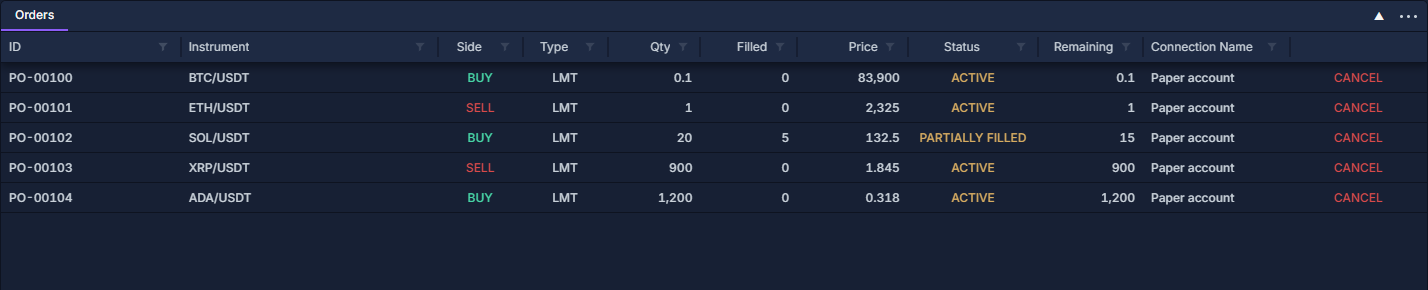
This table demonstrates the controls with populated simulated records. The manual’s broader account illustrations also include derivative examples; those illustrations do not extend the Paper engine’s supported instruments.
Supported order behavior
Reset or return to Live
Open Connections → PAPER → Reset Paper Session and read the confirmation. Reset returns cash to the configured starting balance and clears the current simulated account’s orders, executions and holdings. It is a new practice session, not an archive of the previous one.
To leave Paper, disconnect the current sessions, select LIVE in Connections and reconnect the intended provider account. Inspect the mode and selected instrument again before any later order. Closing or hiding a panel alone does not reset Paper or cancel its working orders.
Connect a provider · Order Entry: prepare and review a ticket · Trading sidebar: sizing, protection and strategies · Portfolio: currency totals and open positions