Portfolio: currency totals and open positions
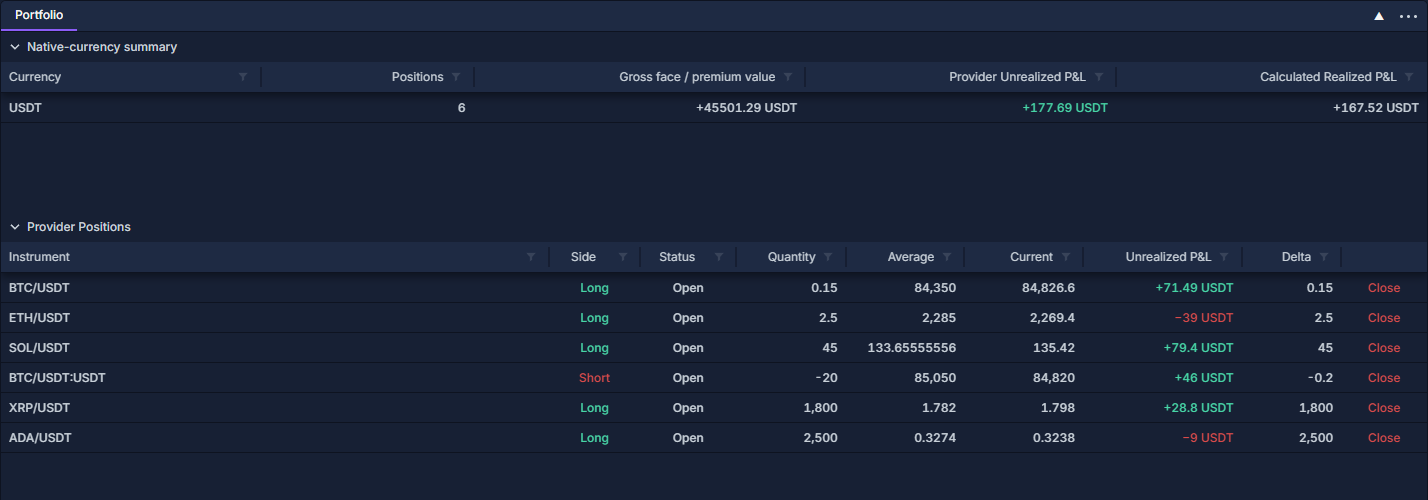
Portfolio combines a Summary by currency with the individual Provider Positions beneath it. Use the summary to see exposure and results by currency, then inspect the contributing positions.
The figures below are a simulated paper-account example. The same example is used throughout the account guides.
Open and read the view
- Open the required account through Connect a provider, or use Paper trading: practice a cash-account workflow.
- Click PANELS → Portfolio. Add and organize panels shows the picker and its entry button.
- Click the chevron beside Summary by currency to expand or collapse the totals.
- Expand Provider Positions to inspect the rows contributing to those totals.
- Right-click a column heading and choose Change columns… for additional identity, contract, fee or time fields. Work with data grids explains this menu, sorting and filtering.
Understand the summary
| Column | Meaning |
|---|---|
| Currency | The currency of the amounts in that row: settlement currency for P/L, quote currency for gross value (settlement currency for options). Different currencies remain separate. |
| Positions | Number of positions whose P/L belongs to that currency. |
| Gross face / premium value | Gross contract or asset exposure, not account equity or cash available to spend. Opposing positions do not net out this gross figure. |
| Provider Unrealized P&L | The combined unrealized result reported for the open positions. |
| Calculated Realized P&L | The terminal's result calculated from available completed execution matches. |
| Ledger fees | Fee total from the accounting ledger; available through the column chooser. |
In the example, six positions contribute +177.69 USDT of unrealized P/L. +167.52 USDT is the separately calculated realized result. The 45,501.29 USDT gross value is neither of those profits.
For ordinary spot quantities, gross value uses absolute quantity times price. Derivative contract size and settlement conventions affect the calculation. Reveal Contract size, Market type, Quote and Settlement currency when comparing different contract types. Missing price or contract information can leave a total unavailable rather than zero.
Trace a result to a position
The BTC/USDT row holds 0.15 BTC, with average entry 84,350 and current price 84,826.6. In this paper example, the price difference times quantity is 71.49 USDT, matching its unrealized result.
The BTC/USDT:USDT row is a separate short derivative position. Its quantity is in contracts; multiplying that number directly by a spot-price difference would ignore contract size. Read its own contract and settlement fields.
Click a P/L heading to sort the position table. Use the instrument or side filter to focus the rows, and clear the filters to return to the whole list. A filter on the position table does not recalculate the separate currency summary.
Act, export and reconcile
Close is at the far right of an eligible position row. Check account, market, side and quantity before using it; Positions: inspect and close an open holding explains the position workflow. The guide's screenshots show the control without submitting a trade.
Export each section through its own column-header menu. An export follows that table's visible columns and filtered rows. Use Trade History: executions and fees to inspect fills, PnL History: understand a closed result for closed matches, and Ledger: trace executions, fees and realized P/L or Commission Stats: fee totals and effective rate for fees. Different data coverage or fee currencies can explain differences between calculated totals and an account statement.