Trade History: executions and fees
Read actual fills, reveal fees and execution IDs, and reconcile a partial order.
Trade History lists executions, the individual transactions produced when orders fill. A working order with no fill has no execution here; an order filled in three parts can have three rows.
This guide uses populated simulated paper-account records.
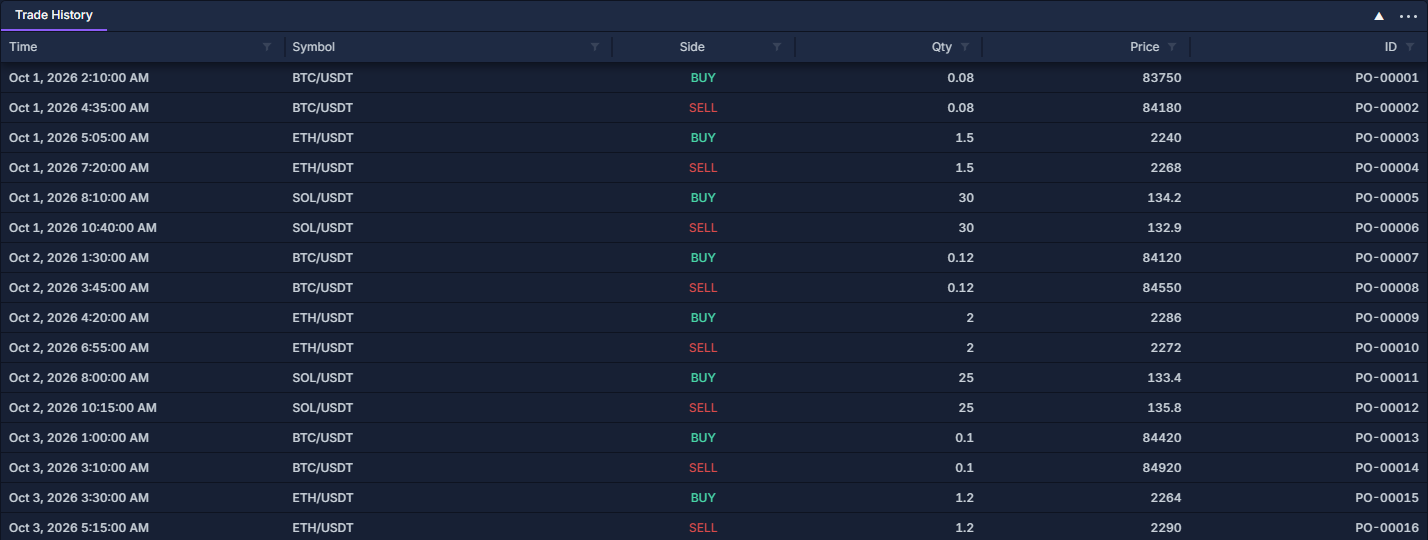
Open and read the table
Click PANELS → Trade History. Add and organize panels shows the picker. Read each row from Time through Instrument, Side, Qty and Price. The default ID column contains the related order ID; use Trade ID for the individual execution identity.
Click Time to sort the sequence. BUY and SELL describe the execution direction; they do not by themselves say whether the transaction opened or closed exposure. Quantity is in the instrument's own unit, which may be assets or contracts.
Show fees and identifiers
- Right-click a column heading, then select Change columns….
- Enable Fee, Fee currency and Liquidity for the view below.
- Add Trade ID, Provider trade ID, Connection Name and Provider when reconciling fills across accounts.
- Use Work with data grids to move columns, change widths and filter the table.
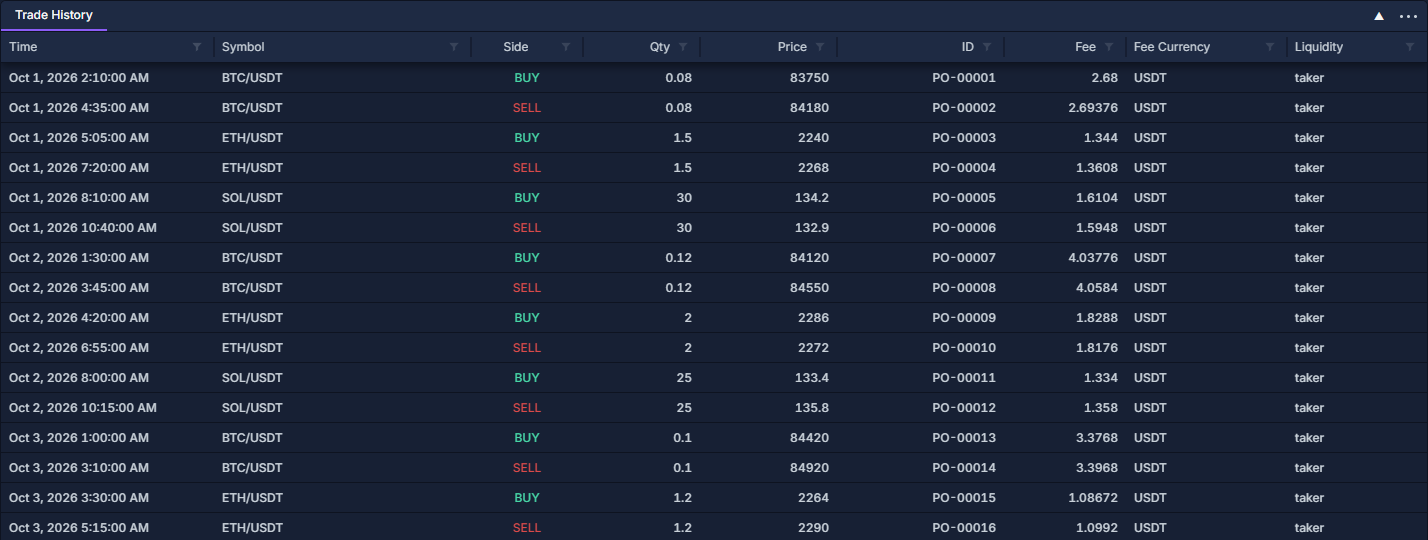
In this paper example, buying 0.08 BTC at 83,750 USDT produces 6,700 USDT of turnover and a 2.68 USDT fee at the simulated 0.04% rate. The later sell at 84,180 has its own fee. Fees on both sides matter when calculating the closed result.
Liquidity, Maker and Taker describe supplied execution classification; do not infer it solely from whether the original order was limit or market. A missing fee or currency is not a known zero.
Reconcile a partially filled order
- Find PO-00102 in Orders: quantities, status and cancellation: it requests 20 SOL, with 5 filled and 15 remaining.
- Filter the ID column in Trade History to that order ID and confirm the account and SOL/USDT market.
- The example's PT-00023 execution is 5 SOL at 132.50.
- Sum the related execution quantities when there are several rows, then compare that sum with the order's Filled quantity.
- Follow the same execution ID into Ledger: trace executions, fees and realized P/L to inspect its 662.50 USDT execution value and 0.265 USDT fee.
Filter, export and interpret coverage
Use the Time column's range filter to inspect a period and the instrument filter to focus a market. These filters narrow records already available to the table; they do not fetch an arbitrary older account history.
The column-header menu exports the visible columns and filtered rows. Include account, order ID, trade ID, quantity, price and fee currency for reconciliation. This is a read-only history view: it does not cancel or alter completed executions.
Use PnL History: understand a closed result for matched closed results and Commission Stats: fee totals and effective rate for fee totals. A fill can add to an open position without producing realized P/L yet.