Reuse panel settings
Save a panel configuration and apply it to another instance.
A panel template reuses one tool's settings. A workspace layout saves the arrangement of several panels.
Save and apply a template
- Configure a panel's columns and display options. For example, choose the Time & Sales columns you use most.
- Right-click its title strip, or click …, then point to Templates → Save as template….
- Enter a recognizable name and click Save.
- In another panel of the same type, open Templates → Apply template and select that name. Check the resulting settings and instrument.
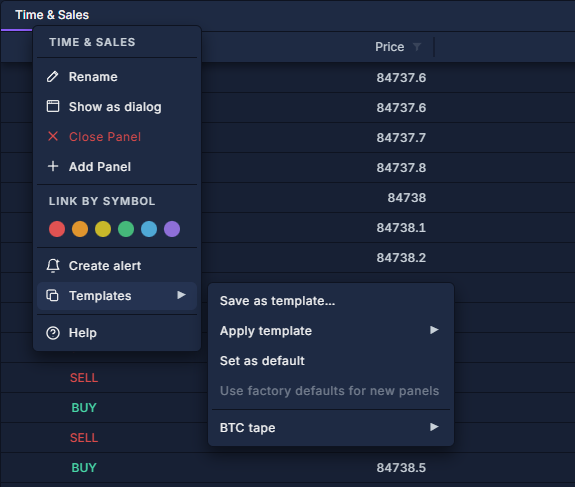
Saved templates also appear under Templates in the PANELS picker, where choosing one opens a configured panel.
Manage defaults and saved copies
Defaults affect new instances; applying a template changes the selected existing panel.
Trading sidebars have a separate Order template control. After loading one, review quantity, unit, order type, price and protection before submission. See Trading sidebar: sizing, protection and strategies and Workspaces and layouts.