PnL History: understand a closed result
Read FIFO execution matches, gross P/L, allocated fees, net P/L and accounting quality.
PnL History shows the realized result when an execution closes earlier exposure. Each row is a matched opening and closing quantity, not necessarily one whole order or one whole position.
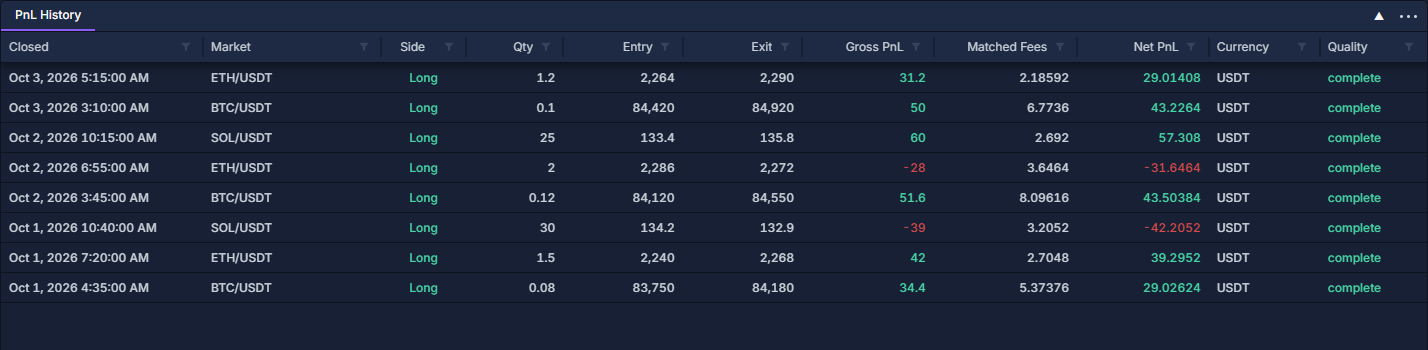
The screenshot contains eight completed matches from the simulated paper account used in the account guides.
Open and read a match
- Click PANELS → PnL History.
- Click Closed to sort by completion time.
- Read Market, Side and Qty, followed by Entry, Exit, Gross P/L, Matched fees, Net P/L, Currency and Quality.
- Right-click a column heading and choose Change columns… to add Opened, connection/provider fields, entry/exit order IDs and entry/exit execution IDs. Work with data grids illustrates the controls.
Side identifies the matched position direction. A long closes by selling; a short closes by buying. The entry and exit columns are prices, while the P/L columns are amounts in the stated currency.
Work through the ETH example
The first row matches 1.2 ETH bought at 2,264 with 1.2 ETH sold at 2,290.
These are simple spot quantities. Contract multipliers and settlement rules affect derivative results; do not apply the spot formula to every instrument.
In Trade History: executions and fees, the example's entry is PT-00015 / PO-00015 and its exit is PT-00016 / PO-00016. Reveal the corresponding ID columns here to trace the match directly.
Why one close can produce several rows
The terminal matches available executions first in, first out (FIFO) within the account, market and position-side group. The oldest open quantity is matched first.
For example, if a position opened as 1 unit and then 2 units, a close of 1.5 units can match all of the first entry and 0.5 of the second. Each match retains its own entry price and allocated fees. A partial close leaves the unmatched quantity open in Positions: inspect and close an open holding.
Matched fees include the portions of opening and closing fees attributable to that row. They need not equal all fees in Commission Stats: fee totals and effective rate, which can also include entries for positions still open.
Quality, filtering and export
Read Quality alongside the result. Missing executions, contract information or comparable fee currencies can prevent a complete net result. Reveal Accounting note to inspect the available explanation; a missing value is not zero, and the terminal does not invent a currency conversion.
Use the market filter or the Closed range filter to narrow available rows. Filtering does not retrieve older account history. Clear filters when reconciling totals, then export the needed rows and identity columns through the column-header menu.
Open-position price changes belong to Positions: inspect and close an open holding and Portfolio: currency totals and open positions. The closed matches on this page can also be traced through Ledger: trace executions, fees and realized P/L.