Ledger: trace executions, fees and realized P/L
Follow accounting entries back to an execution and interpret their amounts without double counting.
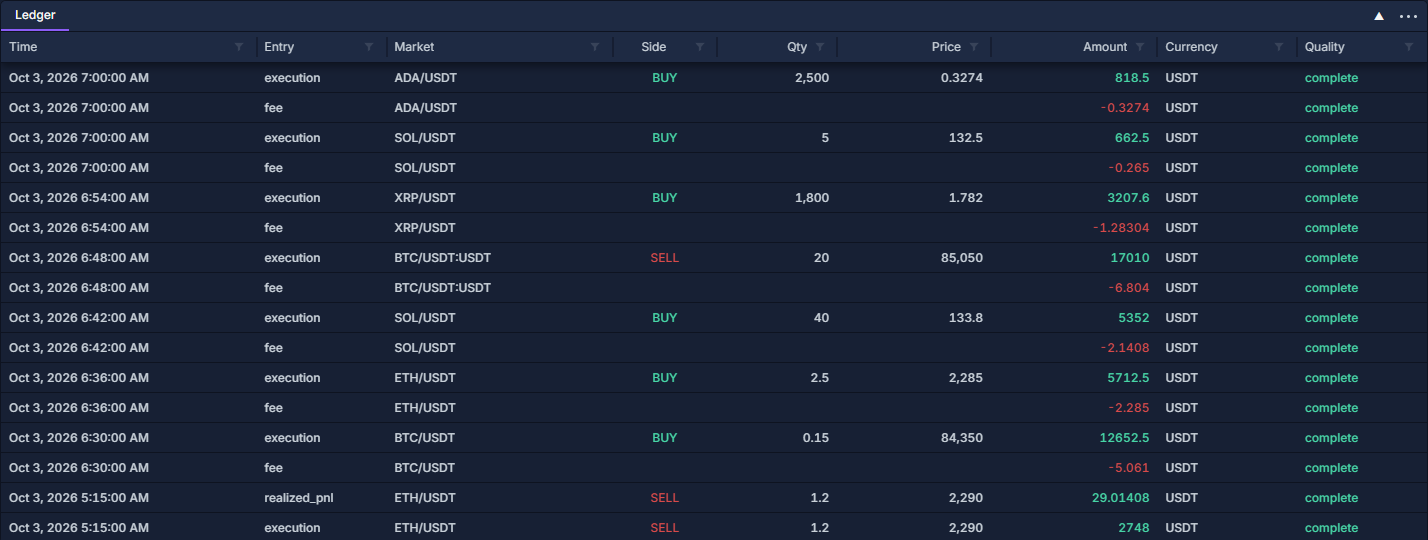
Ledger itemizes the terminal's execution accounting. A fill can produce an execution row, a fee row and, when it closes earlier exposure, one or more realized-P/L rows. It is not a complete wallet statement of deposits, withdrawals and every exchange cash flow.
This populated example uses the same simulated paper account as Orders: quantities, status and cancellation, Trade History: executions and fees and PnL History: understand a closed result.
Open and identify an entry
Click PANELS → Ledger. Read Time, Entry, Market, Side, Qty, Price, Amount, Currency and Quality.
Right-click a column heading → Change columns… to show Connection, Provider, Order ID, Execution ID, Source ID and Accounting note. Work with data grids shows where this menu is and how to filter it.
Quantity and Price apply to execution records. Their absence on a fee row is expected: that row carries a fee amount, not another trade.
Trace the SOL partial fill
- In the column chooser, enable Order ID and Execution ID.
- Filter Order ID to PO-00102, and confirm the paper account and SOL/USDT market.
- Locate PT-00023. Its execution is 5 SOL × 132.50 = 662.50 USDT.
- The fee entry for that execution is −0.265 USDT.
- Compare with the same execution in Trade History: executions and fees and the 5 filled / 15 remaining quantities in Orders: quantities, status and cancellation.
This fill adds to an open position. It does not produce a closed result merely because it has an execution and fee entry.
Avoid double counting
A realized-P/L row already represents the matched net result. Do not subtract its allocated opening and closing fees again. Similarly, do not add execution turnover to realized P/L and call the sum account profit.
Fee totals across the ledger can include open-position entries as well as closed matches. Commission Stats: fee totals and effective rate groups those fees by currency; PnL History: understand a closed result explains which portions belong to each closed match.
Check quality and export
Keep Quality visible. If an amount or currency is unavailable, reveal Accounting note and trace the source execution. Different currencies remain separate; there is no assumed conversion into a single reporting currency.
Use Entry to focus on one record kind, Market to select an instrument and the Time range filter for available records in a period. Clear filters before comparing totals. Filtering the grid does not load older account history.
Export through the column-header menu. Include record kind, currency and execution identity so the exported amounts retain their meaning.